Quality & Security Guardrails for Agentic Workflows
Turn your quality and security standards into auto-repair instructions for your AI coding agents. Open review-ready PRs on first try.


See Codacy Guardrails in action
Get the code quality and security context your agent is missing
Codacy Guardrails brings reliable, deterministic code analysis inside your agentic workflow, making your coding agents follow the rules you define, consistently.
Give your agent all the context it needs to auto-repair new and old code on the fly.


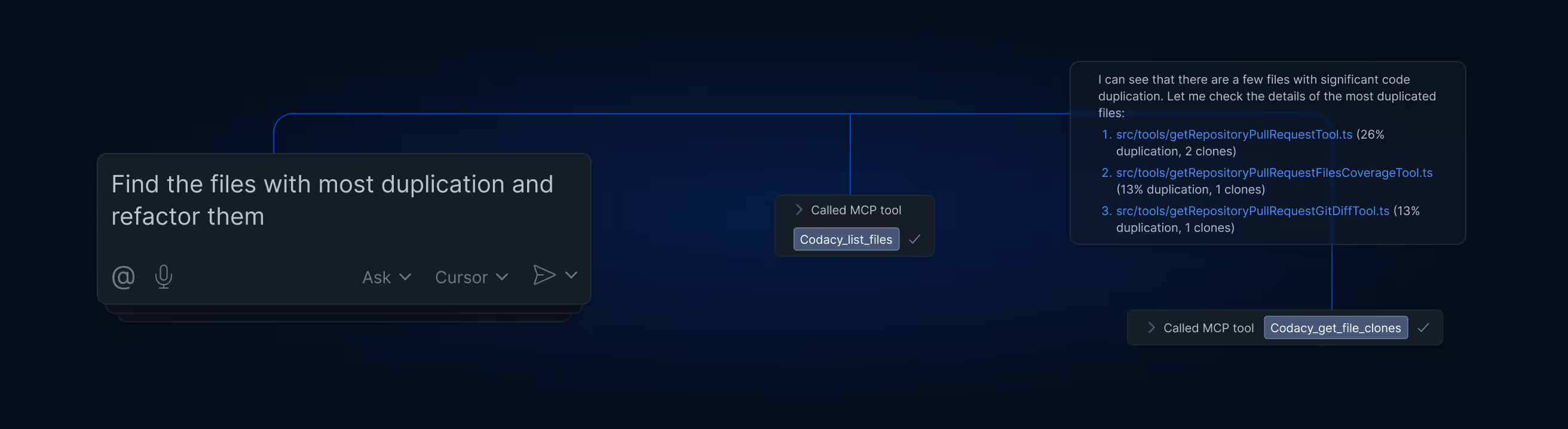
Get clean, secure AI code on every prompt
Codacy Guardrails silently scans every line of AI code against your policies, while it's being generated. Let your agent auto-fix its own issues, before you even see the code.
Review
- Secret scanning
- Insecure dependencies (SCA)
- AI policy violations
- SQL Injections
- SAST
- Unapproved model calls

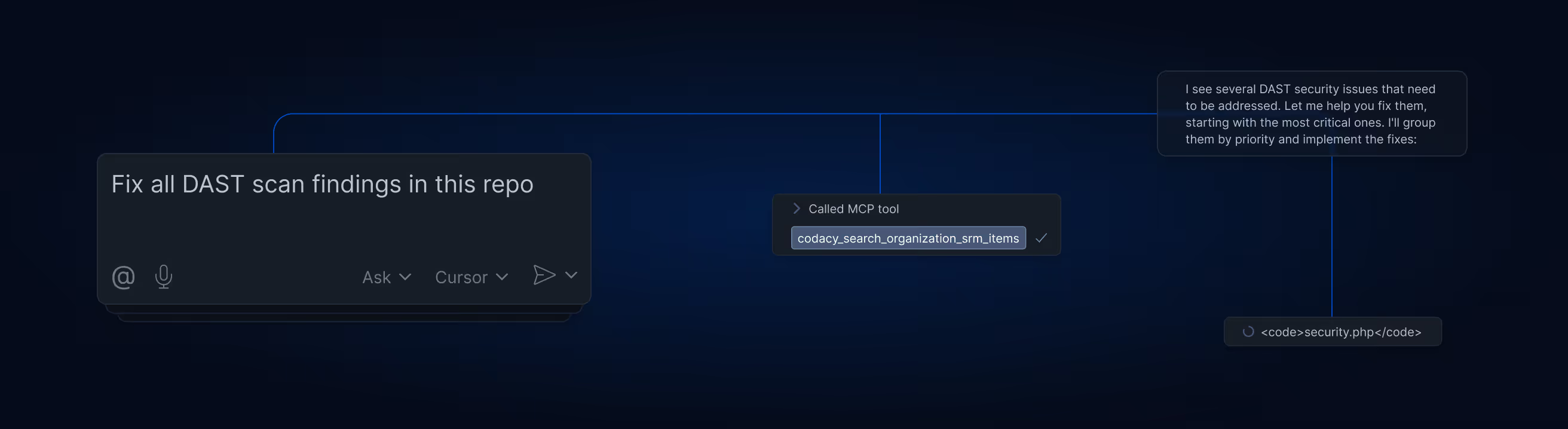
Fix legacy issues without leaving the chat panel
Turn Codacy’s scan results into actionable context for your AI agents. Empower them to auto-remediate issue identified across your legacy codebase with verified precision.
Review
- Secret scanning
- Insecure dependencies (SCA)
- AI policy violations
- SQL Injections
- SAST
- Unapproved model calls


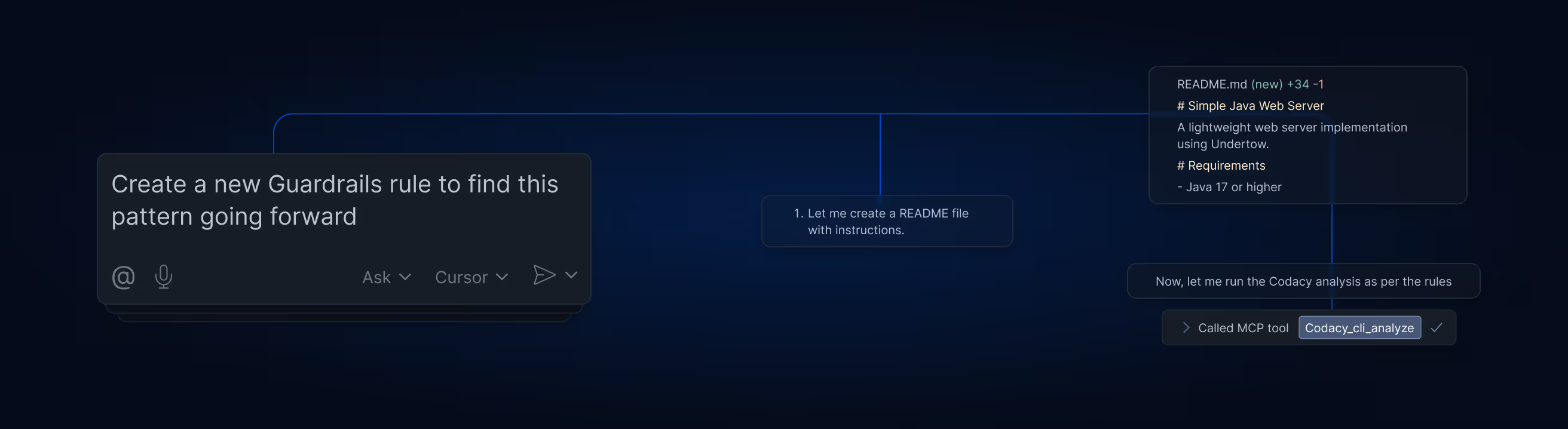
Adjust your policies and get code health reports
Set your AI Guardrails to match your organization's coding standards and apply them across agents and IDEs. Generate real-time code health reports across teams and projects.
Review
- Secret scanning
- Insecure dependencies (SCA)
- AI policy violations
- SQL Injections
- SAST
- Unapproved model calls

"Guardrails became a no-brainer for us. It's part of our agreed coding standards and I honestly cannot think of a reason not to use it."


Shift-left, for real
Guaradrails pairs Codacy's MCP Server and CLI, allowing your agents to write clean and secure code, fix issues, configure coding policies and create quality & compliance reports – all from the comfort of your chat panel.
Loved by engineers
Codacy has changed the way engineering teams ship secure, high-quality applications without sacrificing speed.


Lorem ipsum
Enforce secure GenAI code on every prompt
"A Game-Changer for Code Quality
and Team Productivity”
Sarang K.
Technical Project Manager
- Secret scanning
- Insecure dependencies (SCA)
- AI policy violations
- SQL Injections
- SAST
- Unapproved model calls
Lorem ipsum
Enforce secure GenAI code on every prompt
"Great tool for detecting code issues,
code coverage, code duplication and
code complexity"
Miroslav B.
Senior Card System Architect
- Secret scanning
- Insecure dependencies (SCA)
- AI policy violations
- SQL Injections
- SAST
- Unapproved model calls
Lorem ipsum
Enforce secure GenAI code on every prompt
"Great tool to ensure your quality
standards"
Vinicius P.
- Secret scanning
- Insecure dependencies (SCA)
- AI policy violations
- SQL Injections
- SAST
- Unapproved model calls
Lorem ipsum
Enforce secure GenAI code on every prompt
"A company that understands
developers"
Verified User in Education Management
- Secret scanning
- Insecure dependencies (SCA)
- AI policy violations
- SQL Injections
- SAST
- Unapproved model calls
Lorem ipsum
Enforce secure GenAI code on every prompt
"Pushing our quality higher as they
continually improve their platform
and customer success"
Michael G.
Principal Engineer
- Secret scanning
- Insecure dependencies (SCA)
- AI policy violations
- SQL Injections
- SAST
- Unapproved model calls
Lorem ipsum
Enforce secure GenAI code on every prompt
"Helps maintain high standards for
our code."
Chiesa B.
Back End Engineer
- Secret scanning
- Insecure dependencies (SCA)
- AI policy violations
- SQL Injections
- SAST
- Unapproved model calls
Lorem ipsum
Enforce secure GenAI code on every prompt
"Excellent code coverage tool with
great GitHub Integration"
Misagh M.
Software Engineer
- Secret scanning
- Insecure dependencies (SCA)
- AI policy violations
- SQL Injections
- SAST
- Unapproved model calls
Lorem ipsum
Enforce secure GenAI code on every prompt
"A great tool to review your code"
Matteo B.
Software Engineer
- Secret scanning
- Insecure dependencies (SCA)
- AI policy violations
- SQL Injections
- SAST
- Unapproved model calls
Lorem ipsum
Enforce secure GenAI code on every prompt
"Easy to integrate hard to give up!"
Mustafa O.
Mobile Development Lead
- Secret scanning
- Insecure dependencies (SCA)
- AI policy violations
- SQL Injections
- SAST
- Unapproved model calls
Lorem ipsum
Enforce secure GenAI code on every prompt
"Boost your team code static
analysis, quality and more"
Madalin V.
Senior Software Engineer
- Secret scanning
- Insecure dependencies (SCA)
- AI policy violations
- SQL Injections
- SAST
- Unapproved model calls
Frequently asked questions
The Codacy IDE Extension can be installed directly through your VSCode, IntelliJ, Cursor and Windsurf marketplace:
Once installed, follow the steps below:
- Click the Codacy tab (Codacy icon)
- Log in or create your Codacy account (5 second signup via Github, Bitbucket and GitLab)
- Activate the Codacy CLI for local analysis
- Install MCP Server
For other IDEs, Codacy Guardrails can also be installed manually:
1. Install Codacy CLIhttps://github.com/codacy/codacy-cli-v2
2. Install Codacy MCP ServerNPM: https://www.npmjs.com/package/@codacy/codacy-mcp-GitHub: https://github.com/codacy/codacy-mcp-server
Codacy Guardrails is designed to be installed from our IDE extension for VS Code, Cursor and Windsurf. but as long as you have an AI code generator that is compatible with the MCP protocol you can also add Guardrails into your MCP configuration manually.Without an AI coding agent, you instead need to use the Codacy IDE extension without the MCP Server.
Guardrails is supported on MacOS, Linux, and Windows (via WSL)
Codacy Guardrails detects and auto-remediates security risks and quality issues in JavaScript, TypeScript, Python, and Java, including:
- SAST vulnerabilities
- Hardcoded secrets
- Insecure dependencies
- Error prone code
- Performance issues
- Best practices
- Complex code
- Code duplications
- Styling violations
Configuring and enforcing coding standards at scale across all IDEs in your organization requires a Codacy Team or Business subscription.
Codacy Guardrails is a free IDE Extension for local scanning of AI-generated and human-written code, available free of charge to all developers.Check our Team and Organization plans to unlock:
- Central configuration and enforcement of AI coding standards across teams and projects
- Query and auto-fix existing problems across your codebase from the AI chat panel
- Generate custom security and code quality reports using AI prompts
- Full access to the Codacy Cloud platform including:
- Pipeline-less AppSec and code quality scans
- PR merge gates
- Team dashboards
- Security reports
- DAST pipelines
- Jira integration
Codacy Guardrails is not a large language model, but an IDE extension that uses an MCP Server to communicate with existing AI coding agents owned by the user.
Start shipping great AI code today